Expressive Zsh Theme with Attitude
Delightful kaomojis, snappy Git indicators, active language versions, and instant command execution timers without prompt slowdown.
Visual Demonstrations
Real terminal screenshots showing kaomojis, porcelain git diffs, runtime versions, and active media playback:
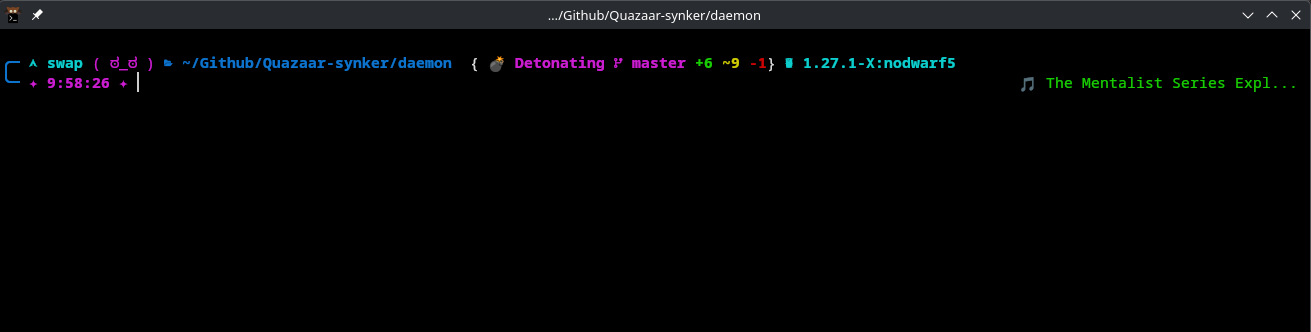
Demonstration 1: Git branch status (+6 ~9 -1), Go runtime badge, and Spotify/playerctl integration.
Random Kaomoji Doodles
Dynamic terminal face expressions like ( ಠ_ಠ ), ♥( ◡‿◡ ), and ( ✦ ‿ ✦ ) update with every command prompt.
Punchy Git Status
Instant porcelain-based Git status with counts of added +N, modified ~N, or deleted -N files and witty action phrases.
Smart Cached Runtimes
Auto-detects Go (), Node.js (), Python (), and Rust () with precmd path caching so your terminal never lags.
Command Execution Timer
Long-running commands (≥ 2 seconds) automatically show their duration in your right prompt cleanly.
Media Integration
Optional Spotify or media player status indicator via playerctl tucked nicely into the right prompt.
Two-Line Clean Aesthetic
Spacious, organized double-line layout ensures long directory paths never wrap or ruin your command line input.